Tactile Ground Surface Indicators (TGSIs) are an essential component of accessible design, helping promote safer, more inclusive environments for users while meeting important compliance requirements across public and commercial spaces.
Beyond their functional role, well-specified, high-quality tactile indicators can complement and enhance design intent, supporting a visually consistent and intentional aesthetic.
This article explores the key compliance requirements for TGSIs, along with practical principles for seamless architectural integration and common specification mistakes to avoid.
What Are TGSIs and Why Do They Matter?
Tactile ground surface indicators (TGSIs), commonly known as tactile indicators, are important navigation aids that help people with vision impairments, mobility challenges, and other disabilities navigate the built environment. According to Vision Australia, approximately 453,000 people in Australia are blind or have low vision, a number projected to increase to 564,000 by 2030. This growing figure highlights the importance of embedding accessible design into everyday public and commercial spaces.
There are two primary types of tactile indicators: Warning Tactiles and Directional Tactiles.
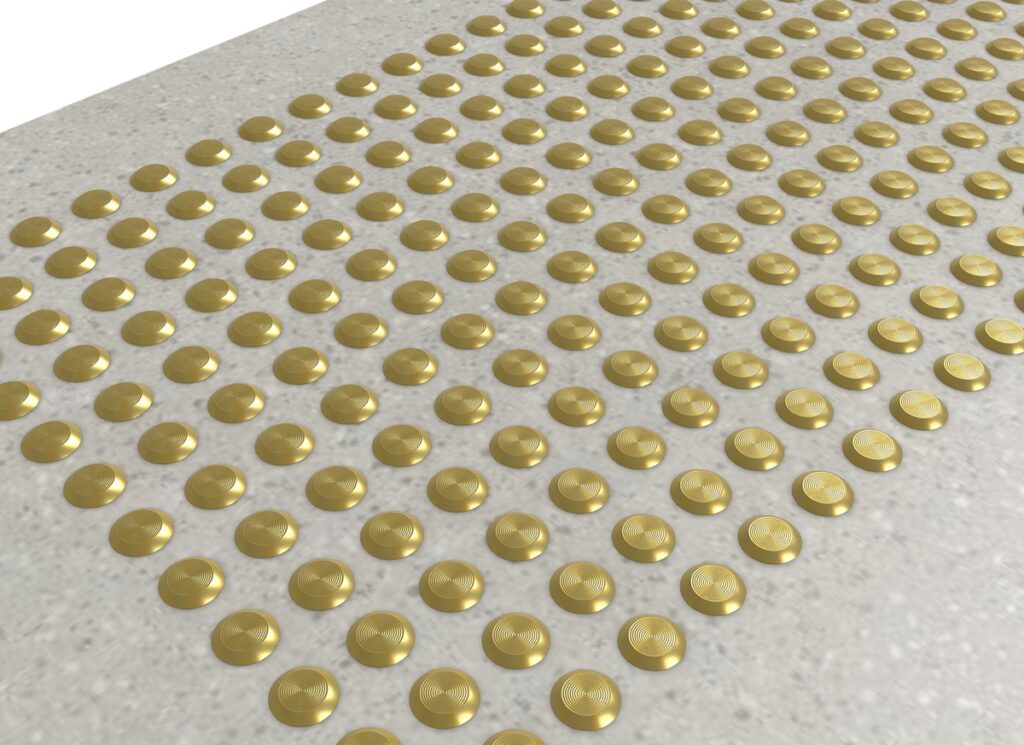
Warning tactiles alert users to potential hazards or changes in the path of travel, such as stairways, platform edges, ramps, or pedestrian crossings.
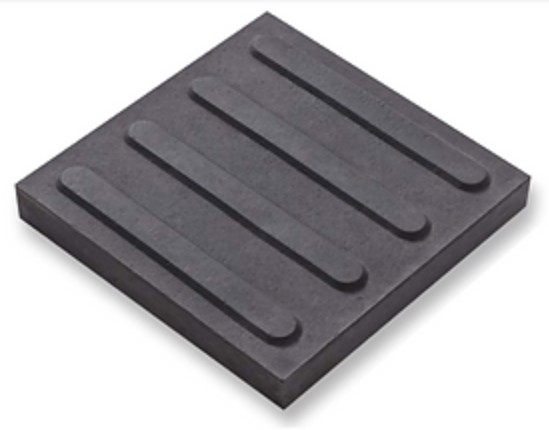
Directional tactiles highlight a safe route of travel, helping users navigate complex or open environments.
Used individually or together depending on the setting, tactile indicators are particularly important in high-traffic environments such as transport hubs, commercial buildings, healthcare facilities, and public spaces, where clear, consistent wayfinding is crucial for safe and confident navigation.
Australian Standards & Compliance Requirements for TGSI
AS 1428.4 Requirements
AS 1428.4 outlines the design and installation requirements for warning and directional tactile indicators, guiding placement, spacing, dimensions, and luminance contrast to ensure consistency and effectiveness across various built environments.
For more information on AS 1428.4 requirements, please download our Tactile Indicators Compliance Guide.
NCC Accessibility Obligations
The National Construction Code (NCC) is a framework that ensures all building classifications are accessible to people with disabilities, in accordance with the Australian Standard.
Specifically, NCC 2022 covers fire safety testing and requirements for building materials, including tactile indicators.
Understanding LRV Contrast
AS/NZS 1428.4.1:2009 specifies requirements for the Luminance Reflectance Value (LRV) of tactile indicators. LRV measures the contrast between tactile indicators and their surrounding surfaces, enhancing visibility and accessibility for individuals with vision impairments.
To meet AS 1428.4 luminance contrast standards:
- Integrated tactile indicators (plate or tile format): Minimum 30% luminance contrast with the surrounding substrate.
- Single-coloured individual tactiles: Minimum luminance contrast of 45% with the surrounding surface.
- Two-coloured individual tactiles: Minimum luminance contrast of 60% with the surrounding surface.
Learn more about why luminance contrast matters in tactile indicators.
Slip Resistance
In addition to AS 1428.4, AS4586:2013 outlines slip-resistance testing and slip-rating requirements for compliant tactile indicators. Particularly crucial for high-traffic and wet environments, slip-resistant tactiles indicators help ensure surfaces remain safe underfoot and reduce the risk of slips, trips, and falls.
Read more about Australian slip resistance standards for tactile indicators.
Placement Requirements: Interior vs Exterior Considerations
Understanding the difference between indoor and outdoor tactile indicators is fundamental to ensuring compliance, durability, and long-term performance.
Interior applications typically focus on recommended circulation paths and hazard identification, prioritising accessibility, aesthetics, and low-maintenance. On the other hand, exterior installations must consider weather exposure and changing environmental conditions.
Download our Tactile Indicators Compliance Guide to learn more.
Why Poorly Integrated TGSIs Can Undermine Architectural Design
Poorly integrated TGSIs can disrupt the visual quality of a space and impact the overall user experience.
Common issues can include:
- An overly industrial appearance that clashes with surrounding architectural finishes
- Inconsistent finishes across different areas, detracting from the overall aesthetic
- Poor material selection that doesn’t satisfy the design and maintenance requirements
- Visual clutter that interrupts spatial flow and distracts from key focal elements
- Retrofitted appearance that doesn’t age well and looks like an afterthought
- Conflicting colour palettes that reduce visual cohesion
Ultimately, seamless integration is not just about ticking compliance boxes but creating a safe, welcoming space that feels intentional. Through early planning and considered product selection, integrating tactile indicators into architecture balances functionality with design, prioritising both accessibility and visual cohesion.
Principles for TGSI Integration
Start Planning Early
Architects should incorporate tactile indicators and other essential floor safety and access solutions during the concept phase to assist circulation planning and floor finish selections.

Early coordination allows for seamless integration with the overall architectural intent, reducing the likelihood of compliance issues and unnecessary design compromises later in the project. It also helps avoid costly retrofits, remedial works, and last-minute specification changes that can affect both the budget and the timeline.
By integrating architectural tactile systems from the outset, projects can deliver safer, more inclusive user experiences while ensuring ongoing compliance.
Select Materials That Complement the Space
The best materials for tactile indicators will depend on predicted traffic volumes, environmental conditions, maintenance requirements, and desired aesthetic outcome.
| Material | Typical Applications | Key Benefits |
| Stainless Steel | Interior & Exterior Use – Transport hubs, commercial buildings, public spaces | Highly durable, corrosion-resistant, polished appearance |
| Brass | Interior & Exterior Use – Luxury hotels, premium retail, heritage buildings | Elegant, timeless finish that ages gracefully over time |
| Aluminium | Interior Use – Commercial offices, public buildings, education facilities | Lightweight, durable, cost-effective |
| Polyurethane | Interior & Exterior Use – Schools, healthcare facilities, community hubs | Wide range of colour options, UV-resistant |
| Ceramic | Interior & Exterior Use – Shopping centres, public spaces, pedestrian areas | Durable, UV-stabilised, low maintenance |
| Fibreglass | Exterior Use – Industrial environments, transport hubs, retail precincts | Exceptional strength and durability, suitable for harsh conditions |
| Concrete | Exterior Use – Public transport hubs, heavy-use pedestrian areas | Highly durable, robust, UV-resistant |
Consider Colour & LRV Contrast Carefully
While tactile indicators should be clearly visible and easily detectable to support accessibility and compliance, they should also complement the surrounding design rather than being visually disruptive.
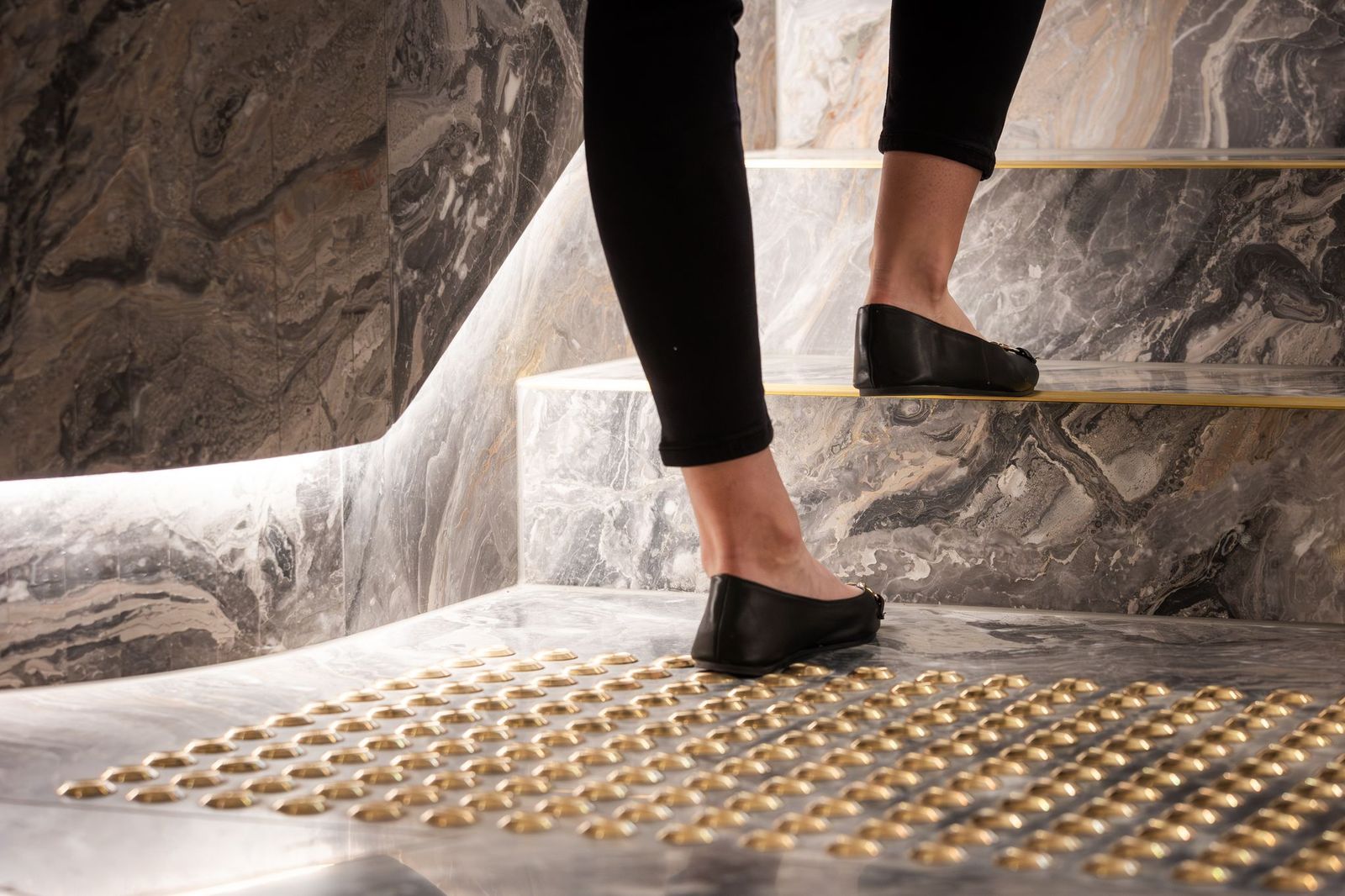
Thoughtful colour selection and tonal contrast strategies can help blend aesthetics with functionality, rather than relying solely on stark colour differences. Architects can use complementary tones and finishes to maintain compliance while seamlessly integrating the tactiles into the wider colour and material palette.
What LRV contrast is required for tactile indicators under AS 1428.4?
- Integrated (tile) type tactiles: Minimum 30% luminance contrast with the surrounding substrate.
- Individual tactiles—one colour: Minimum of 45% luminance contrast with the surrounding surface.
- Individual tactiles—two colours: Minimum of 60% luminance contrast with the surrounding surface.
To ensure compliance, use Classic Architectural Group’s FREE LRV Contrast Calculator for your project.
Match TGSI to Traffic and Environment
Selecting products based on the expected environment and traffic levels is essential for achieving long-term performance.
High-traffic environments such as public transport hubs, shopping centres, commercial buildings, and community spaces will require highly durable tactile indicators to withstand constant movement.

Outdoor applications will have additional considerations such as UV exposure, moisture, temperature fluctuations, and potential corrosion. Similarly, tactile indicators for wet areas will need to meet higher requirements for slip resistance and luminance contrast.
When choosing tactile indicators, architects should consider durability, ease of maintenance, replacement options, and desired lifecycle performance alongside initial specification costs to ensure long-term value.
Common TGSI Design Mistakes to Avoid
❌ Choosing Products Based on Price Alone
One of the most common tactile indicator mistakes is making decisions based solely on the upfront cost. While lower-cost products may appear attractive from a budget perspective, they often offer limited finish options and reduced durability.
Taking a lifecycle-costing approach often provides greater long-term value. Higher-quality tactile indicators from a trusted supplier are designed to withstand heavy use, maintain their appearance, and facilitate ongoing compliance. This reduces the likelihood of additional costs due to premature replacement or remedial works down the line.
❌ Late-Stage Specification
While tactile indicators may seem like a relatively small component of the overall development, they play a critical role in safety and accessibility.
Leaving product specification until the latest stages of construction can limit available options and force design compromises. It may also result in costly project delays and compliance issues.
❌ Selecting Products Unsuitable for Traffic & Environmental Conditions
Not all tactile indicators are suitable for every application. Expected traffic levels, exposure to weather, maintenance requirements, and environmental conditions should all influence product selection.
For example, external tactile installations may require materials with enhanced corrosion resistance, while coastal environments may benefit from marine-grade finishes. High-traffic public spaces often demand more durable materials than lower-traffic commercial settings.
If tactile indicators aren’t correctly specified or properly installed in accordance with the recommended compliance requirements and maintenance guidelines, they can exacerbate safety and access issues, defeating their purpose.
❌ Failing to Coordinate with Floor Finishes
One common mistake architects make with tactile indicators is neglecting the surrounding floor finishes. To meet AS/NZS 1428.4 standards, tactiles must satisfy minimum luminance contrast requirements relative to the surrounding surface to ensure maximum visibility and intended performance.
In addition to meeting luminance contrast requirements, designers should consider how different floor finishes will affect installation methods, visual integration, and long-term performance.
❌ Overlooking Long-Term Maintenance
Different materials and installation methods can have varying maintenance requirements depending on the environment and level of traffic.
Regular inspections and maintenance help ensure tactile indicators continue to perform as intended. Any damaged, loose, or worn components should be repaired or replaced promptly to maintain accessibility, safety, and compliance over time.
Allianz Headquarters, Adelaide — Integrated TGSIs for Design, Accessibility & Compliance
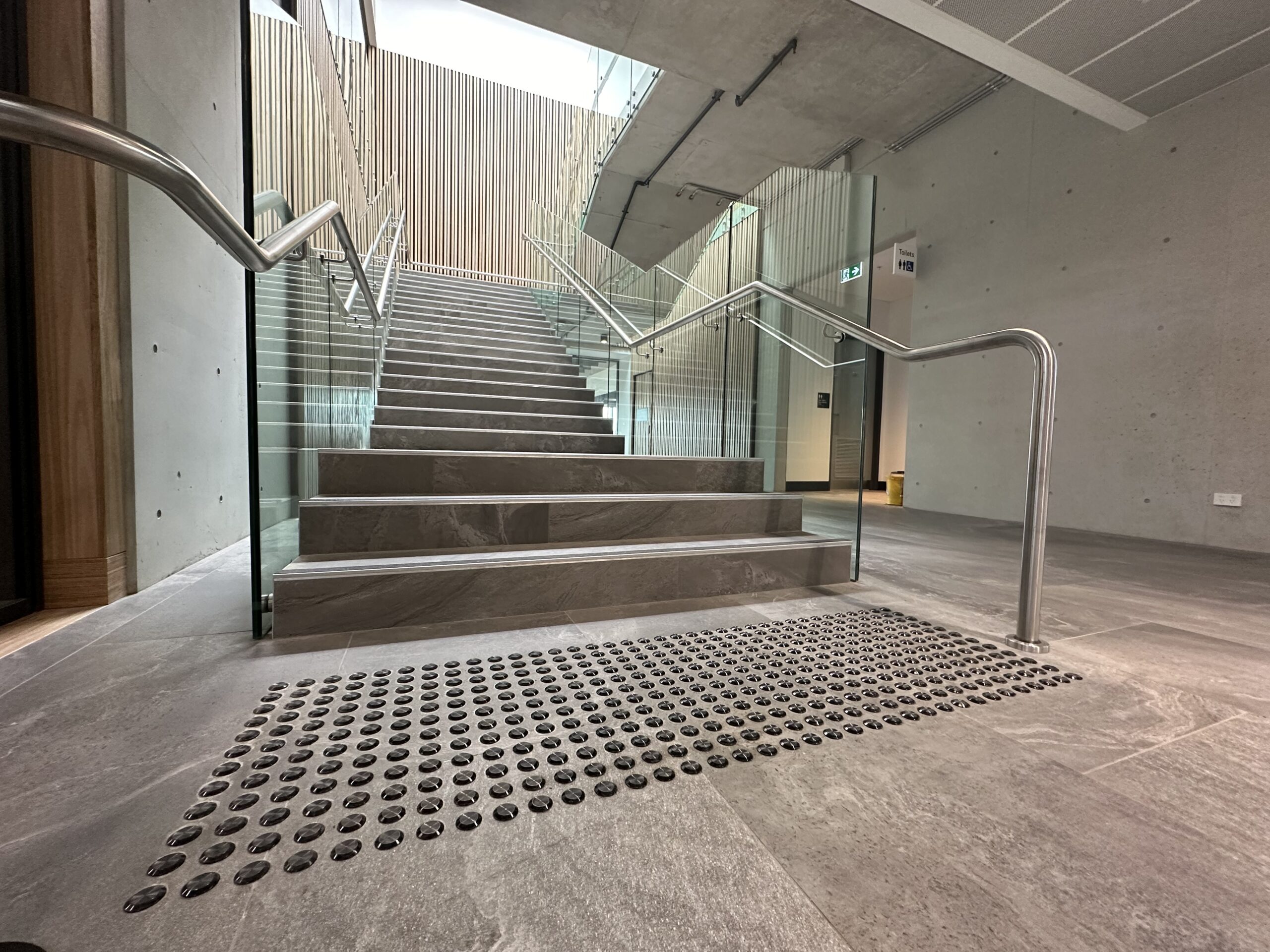
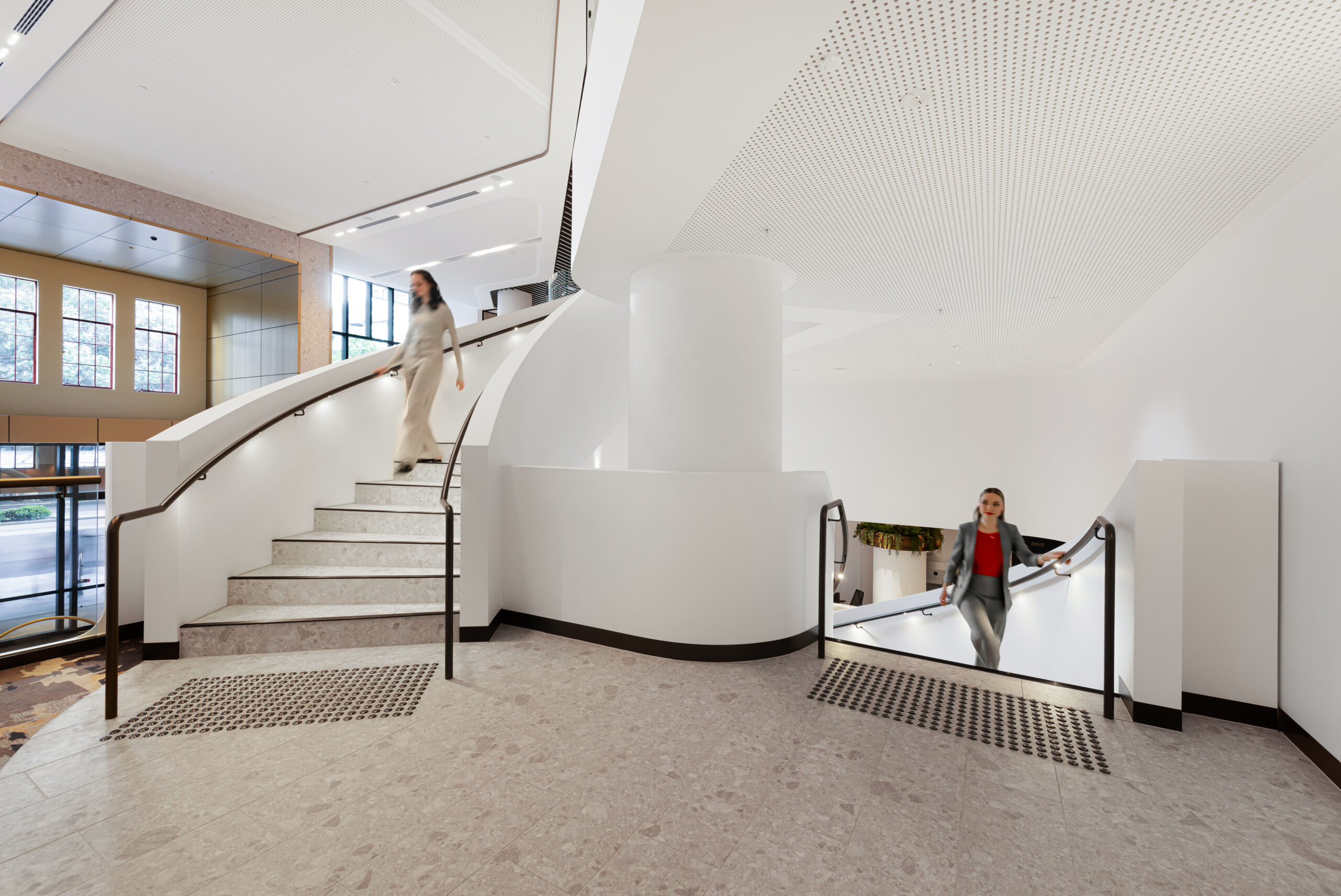
Spanning approximately 4,000 sqm across two levels, the Allianz headquarters in Adelaide features a sophisticated workplace fitout designed to balance design, accessibility, and user experience. A standout feature of the project is the statement interconnected staircase, acting as a functional architectural focal point within the space.



Working alongside Active Metal, Classic Architectural Group supplied bronze anodised Classic Tredfx AH10N Tactile Indicators and Classic Tredfx SNB031 Stair Nosings to complement the staircase’s premium finishes, including timber treads, black handrails, and integrated LED lighting.
The final result demonstrates how accessibility and compliance features can be seamlessly integrated into a high-end architectural vision.
Read the full Allianz, Adelaide case study details.
Frequently Asked Questions
When should TGSIs be specified in a building project?
TGSIs should ideally be specified during the early design and documentation phases of a project. Early consideration allows architects and designers to prioritise compliance while ensuring seamless integration with the overall space.
Leaving it too late risks limited product options, installation challenges, and costly project delays.
Where should tactile indicators be installed?
Tactile indicators should be installed wherever people who are blind or vision-impaired may require directional guidance or need to be alerted to potential hazards. They are typically installed at rail platforms, stairways, escalators, moving travelators, ramps, pedestrian crossings, and other key decision points within the built environment.
What is the difference between warning and directional tactiles?
Warning tactile indicators are designed to alert users to potential hazards or changes in conditions ahead, such as a platform edge or a pedestrian crossing.
On the other hand, directional tactiles are installed to provide wayfinding information, guiding users along a safe, accessible path of travel through public spaces.
Can tactile indicators be customised to match architectural finishes?
Yes. Modern tactile indicators are available in a wide range of materials, colours, finishes, and formats, allowing them to complement the surrounding architectural design while maintaining compliance.
Classic Architectural Group can customise your tactiles to align with your specific project requirements, ensuring they integrate seamlessly with the overall aesthetic.
What is the difference between surface-mounted and recessed tactile indicators?
Surface-mounted tactile indicators are installed directly onto an existing floor surface, while recessed tactile indicators are installed into the substrate so they sit flush with the surrounding surface.
How Classic Architectural Group Supports Accessible Design
With over 45 years of experience, Classic Architectural Group partners with architects and building professionals to deliver compliant, architecturally designed safety and accessibility systems. As a trusted tactile indicator supplier Australia-wide, we provide end-to-end support from consultation through to installation, along with custom solutions that help streamline the specification process.
Designed to work together seamlessly, we provide fully integrated solutions for stairs, floors, entrances, bike storage, bollards, and car park safety. Supporting efficient documentation and coordination, we also offer a comprehensive suite of BIM/ Revit resources and AR/3D visualisation tools that assist with accurate planning and architectural integration.
With nationwide supply and installation capability, we work across projects of all scales, from commercial builds to major infrastructure projects.
Conclusion: Accessibility and Design Should Work Together in TGSI Specification
Accessibility is no longer separate from design excellence. When considered early and specified with intent, TGSI solutions contribute to safer, more intuitive environments without compromising architectural vision. Thoughtful integration strengthens both compliance outcomes and the overall user experience.
For architects, builders, and specifiers, early collaboration is key. Speak with the team at Classic Architectural Group to explore compliant, design-focused TGSI solutions tailored to your next project. We’re here to help you get a step ahead.